
When the Server Agent is running, it doesn't show a systray icon like the Windows Client does. The option to update the login credential in Server Agent is in the Native Management Console.
- Open the Native Management Console
To open the Native Management Console, open the command prompt and execute this command:
"c:\Program Files\Gladinet\Cloud Server Agent\GTaskMMC.exe" /runlocal /server- At the bottom, click on 'Edit Account Information' 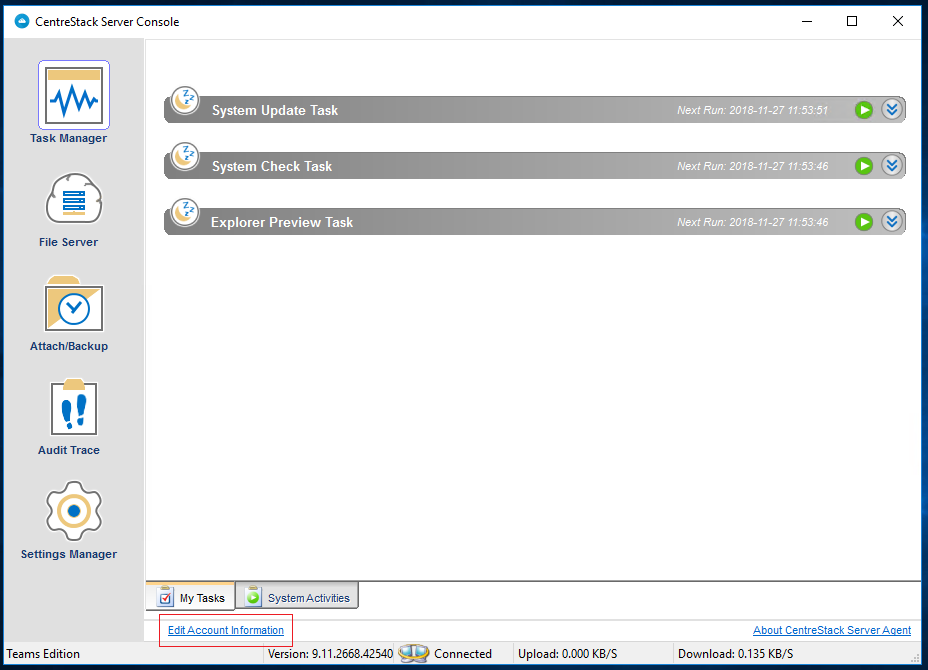
- The login windows will be prompted and you can update the User Name, Password and Access Point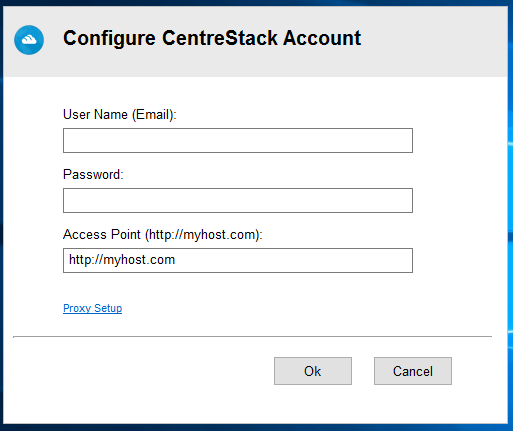
Comments
3 comments
alaska clarke all my googling outputs brought to me to article like yours where you described how to change the defualt save location setting to another specifc location, but i have not a specificic location in mind now. I just want word opens or when I brows for files, takes me to the most recent folder I used my very last time, can you help me with this?
globe sim card registration all my googling outputs brought to me to article like yours where you described how to change the defualt save location setting to another specifc location, but i have not a specificic location in mind now. I just want word opens or when I brows for files, takes me to the most recent folder I used my very last time, can you help me with this?
The setup process involves creating a SAML Enterprise Application in Azure AD Premium and linking it with your CentreStack tenant. Configure the required SAML endpoints, upload the certificate, and map user attributes correctly. After saving the settings, validate the proguide mags bitlife moded.
Please sign in to leave a comment.